
Windows 10 Download Instructions
If Star Analyzer is running, close it before you proceed.
Before you download Star Analyzer by clicking the download link at the bottom of this page, please scan through the following instructions. They will help you get around some over agressive anti-virus.
Star Analyzer is perfectly safe to install on your computer. If your anti-virus program stops the install, you can use Google to find out how to temporarily disable it.
For example, I was just running the Chrome web browser with Malwarebytes recently installed and it pops up a frantic warning message. "Warning, you may be putting your system at risk by visiting this site." Scary, but not true. I had to temporarily disable Malwarebytes.
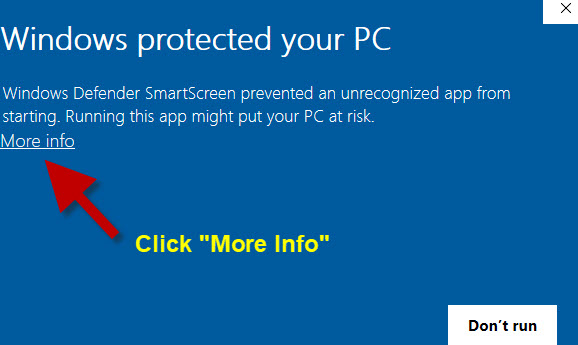
If Windows 10 Defender is running, you might see a warning screen like this one. In this case, click the "More Info" line in the upper-left of the screen.
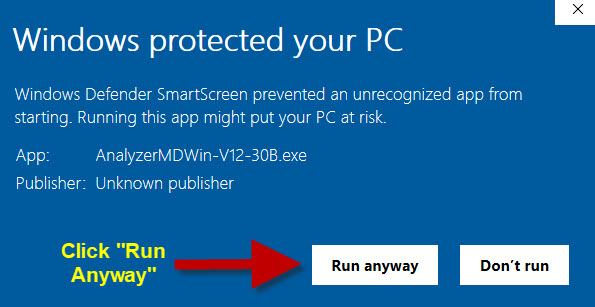
On the next screen you see, click the
Run Anyway
button on the lower right as shown below.
After you get past the anti-virus hurdles and click the download link below, you may be asked if you want to "Run", "Open", or "Save" the program. Click Run or Open if possible. If you only have the option to "Save", be sure to remember where you saved the file on your computer.
After the download is complete, you may see a dialog box that says the publisher could not be verified. If so, select "Run" or "Open".
Once you're through the hurdles, you will see the Star Analyzer installer screen. Click the "No-Questions-Asked Installation" button to proceed.
After the installation is complete, you’ll find a Star Analyzer icon on your computer's desktop. Double-click it to run the program.
OK, that's it for download instructions. Click the link below to download the program now.
Click here to download Star Analyzer for Windows
If you have any problem installing the program, contact Star Analyzer tech support.
Downloading Help
If you need help downloading Star Analyzer, click the Contact menu and one of our support technicians will be happy to help you.